Do Shopify stores need a ChatGPT product feed app, and why aren't my products showing in ChatGPT?
A Shopify store that is eligible for Shopify Catalog and sells to US customers needs no feed app for ChatGPT. Shopify sends its products automatically, and OpenAI says no setup or application is required. A feed app helps in three cases: stores Shopify Catalog doesn't accept, product data edited for ChatGPT, and ChatGPT ads.
How do Shopify products get into ChatGPT?
Shopify products reach ChatGPT through Shopify Catalog, the product data Shopify shares with AI channels, and an eligible store is included without doing anything. OpenAI puts it plainly on its merchants page: “If you sell through Shopify or Etsy, your catalog is already integrated, and no additional setup or application is required.” OpenAI’s March 24, 2026 update said the same of Shopify Catalog: “No additional work is required from individual merchants.”
Shopify lists four requirements for ChatGPT:
- The store sells to customers in the United States. It can be based anywhere.
- The products are eligible for Shopify Catalog.
- The store has accepted the Shopify Agentic Storefronts Supplemental Terms of Service.
- Terms of service, Privacy policy and Return and refund policy are filled in under Settings > Policies.
To check, open Sales channels > Agentic in the Shopify admin. It shows whether the store is eligible for Shopify Catalog, how many products are in it, and whether ChatGPT is active. Each product’s Manage publishing panel has an Agentic tab that shows its own Shopify Catalog status. When a shopper buys, some purchases complete in the chat (through the Shop skill, the Shop App for ChatGPT or agentic checkout), and the rest are paid on your online store checkout inside ChatGPT’s in-app browser or a new tab. How Catalog works, and which other AI channels read it, is in Shopify agentic storefronts and Shopify Catalog.
What if my store isn’t eligible for Shopify Catalog?
A store that isn’t eligible for Shopify Catalog can’t reach ChatGPT through Shopify, and a feed app doesn’t change that, because eligibility is decided by the store’s plan, account and order history. In the Shopify admin, an ineligible store sees “Your store isn’t eligible for Shopify Catalog yet, but AI agents may still show your products,” and the common reason reads: “Your store doesn’t currently meet the requirements for Shopify Catalog access. A strong history of legitimate, well-managed orders will improve your standing over time.”
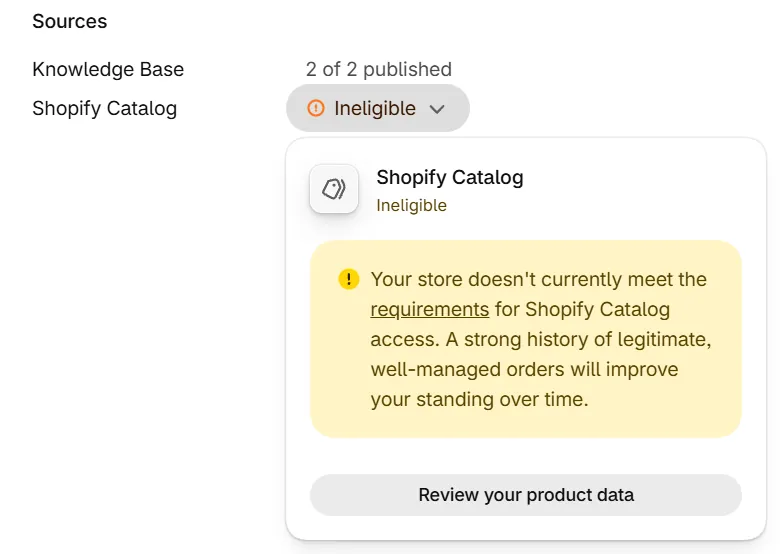
Shopify’s requirements for the store and account:
- The Starter plan or higher, and not in development mode, private mode or behind a password.
- Not set to serve B2B customers only.
- A secured account: verified email, two-step authentication, a passkey where offered, and identity and business verification when asked.
- An operating history: genuine sales to real customers, orders fulfilled promptly and accurately, low chargebacks, Shopify invoices paid on time and Shopify Payments in good standing.
Shopify says “Eligibility is reviewed over time”: a store that meets the requirements later becomes eligible, and one that stops meeting them loses it. Until the store qualifies, ChatGPT has two other ways to find its products. OpenAI’s merchants page answers “Do I need a product feed if ChatGPT already crawls my site?” with “No, but feeds give you greater control over how your products appear,” so keep product pages open to crawlers. And since Businesses in ChatGPT opened in beta on November 10, 2026, a business can claim itself in Business Hub and, once verified, add self-service product feeds with pricing and availability. OpenAI takes those feeds by manual upload, a hosted HTTPS URL or SFTP, as full snapshots, which is where a feed app’s scheduled feed URL fits. The fields are in the OpenAI product feed spec.
Why aren’t my products showing in ChatGPT?
For a Shopify store, start with Shopify Catalog: the store isn’t eligible, the product isn’t, or ChatGPT’s access is switched off. The Agentic page and each product’s Agentic tab show which. The causes and fixes below come from Shopify’s Catalog requirements and agentic storefronts help.
| What you see | Likely cause | Fix |
|---|---|---|
| The Agentic page says the store isn’t eligible for Shopify Catalog | Plan below Starter, a development store, or account standing and order history Shopify hasn’t accepted yet | Move to Starter or higher, build a record of real, well-fulfilled orders with low chargebacks, and complete identity and business verification |
| Ineligible: store is password protected | The online store password is on | Remove the password |
| Ineligible: store serves only B2B customers | The B2B-only option is on | Turn it off |
| Ineligible: store is opted out of sharing products with AI channels | A store-level opt-out, separate from the Catalog access setting | Contact Shopify Support |
| Store is eligible but ChatGPT isn’t active | Channels set to Manual with ChatGPT’s Shopify Catalog access off | Turn Shopify Catalog access back on for ChatGPT |
| Store is eligible for Catalog but missing from ChatGPT | The store doesn’t sell to US customers, or the policies or Supplemental Terms are incomplete | Sell to US customers, fill in the three policies in Settings > Policies, and accept the terms |
| A product’s Agentic tab shows “Shopify Catalog: Unpublished” | No image, a price of zero, not published to the Online Store, Hydrogen or Headless channel, or set to Unlisted | Add an image, set a price above zero, publish the product and change it from Unlisted |
| A whole type of product never appears | An excluded category: alcohol, tobacco and vaping, CBD, weapons, adult products, event tickets, add-ons such as warranties, or uncategorized products | None for excluded categories. For uncategorized products, describe the product clearly: Shopify classifies from product information, not only the admin category |
| ChatGPT shows an old title or price | Catalog mapping changes are processed with a delay | Wait, then check the product data mapping under Sources > Shopify Catalog on the Agentic page |
| The product is in Catalog but not in answers | ChatGPT ranks and words its own results | Improve titles, descriptions, images, barcodes and variant option names, and run queries in the Agentic page’s search preview |
Shopify is explicit about the last row: “Being included in Shopify Catalog doesn’t guarantee that a product will appear in a specific AI answer.” Blocking crawlers in robots.txt doesn’t remove products from Catalog, but it does close the crawl route for a store that isn’t in Catalog.
When does a ChatGPT feed app help a Shopify store?
A feed app helps a Shopify store with ChatGPT in three cases, and for an eligible store with clean product data, none of them may apply.
The store isn’t eligible for Shopify Catalog. A feed app can produce the product feed for Business Hub as a hosted URL that stays current.
You want edited product data. For a store already in Catalog, Shopify’s Catalog mapping is the built-in way to change the title and description ChatGPT reads: it can take either one from a metafield. A feed app suits stores that want one set of edits, made once, sent to ChatGPT feeds, Google Merchant Center (which feeds Google AI Mode and Gemini) and the ad channels.
You run ChatGPT ads. ChatGPT Ads Manager builds product ads from a product feed uploaded as CSV or TXT, from a hosted URL or over SFTP. Items expire after two weeks, so OpenAI recommends a hosted URL or automated SFTP. During the beta, products in this feed appear only in ads, never in organic ChatGPT conversations. OpenAI’s own ChatGPT Ads for Shopify app syncs a store’s catalog into this ads feed, for Shopify stores in the US, so a feed app is for stores that want edited titles in their ads or one feed tool for every channel.
These Shopify feed apps name ChatGPT or OpenAI as a channel on their App Store listing or pricing page. FeedShine sends a CSV feed to OpenAI’s product feed spec, which you add in ChatGPT Business Hub as a hosted URL, on every paid plan (the Free plan is Google only), for US shoppers. It builds that feed from the same catalog as its Google feed, so you manage products once for every channel, and it also sends a Perplexity feed and has an MCP connector for Claude and ChatGPT. It is new to the App Store, with few reviews yet, and is not the cheapest at small catalog sizes.
FeedShine is made by the team that publishes this site. It is scored on the same criteria as the rest.
| App | ChatGPT, in the vendor's words | 1,000 products | Free plan or trial | Rating |
|---|---|---|---|---|
| FeedShine | ChatGPT, Perplexity | $29 a month | Free to 10 products | 5.0 from 1 review |
| DataFeedWatch | ChatGPT, Perplexity Shopping | $64 a month | 15-day trial | 4.7 from 345 reviews |
| Simprosys | ChatGPT | $8.99 a month | 21-day trial | 4.9 from 4,980 reviews |
| Multifeed | ChatGPT | $5.95 a month | Free to 10 products | 4.9 from 1,124 reviews |
| Mulwi | ChatGPT | $15 a month | Free to 50 products | 5.0 from 631 reviews |
| FeedHub | OpenAI Feed | $29.90 a month | Free to 50 variants | 4.9 from 445 reviews |
| Omega | OpenAI / ChatGPT ads | $13.99 a month | Free to 100 products | 4.7 from 112 reviews |
The full ranking, with every app that sends a ChatGPT feed, is in the best ChatGPT shopping feed apps.
How do I see sales from ChatGPT in Shopify?
The Performance section of Sales channels > Agentic shows sales, orders, online store sessions and conversion by AI channel, ChatGPT included, and Shopify’s total sales report can show them too. For ads, ChatGPT Ads Manager reports on its own campaigns, and OpenAI’s Shopify app sends commerce events through the OpenAI Pixel.
Questions people also ask
Can a store outside the US sell on ChatGPT through Shopify?
Yes, if it sells to US customers. Shopify says the store can be based in any country, but ChatGPT requires selling to customers in the United States, and OpenAI says shopping in ChatGPT is live in the US and will expand to more regions.
Is selling on ChatGPT free for Shopify stores?
Shopify lists no ChatGPT-specific fees, only standard payment processing, and OpenAI says there are no fees on purchases that start in ChatGPT. ChatGPT ads are a separate, paid product.
How do I remove my Shopify products from ChatGPT?
In Sales channels > Agentic, open the channel settings, switch from Manage for me to Manual, click ChatGPT and turn off Shopify Catalog access. Shopify says sharing can take up to 7 days to stop, and ChatGPT can still find products by crawling your site.
Sources
Page updated November 26, 2026. App prices, ratings and channels come from each app's own listing and website, checked on the dates below.
- Power product discovery in ChatGPT (OpenAI merchants page) checked November 26, 2026
- Selling on ChatGPT (Shopify Help Center) checked November 26, 2026
- Requirements for being included in Shopify Catalog (Shopify Help Center) checked November 26, 2026
- Shopify Catalog (Shopify Help Center) checked November 26, 2026
- Shopify Catalog and product discovery for agentic storefronts (Shopify Help Center) checked November 26, 2026
- Customizing product data for Shopify Catalog (Shopify Help Center) checked November 26, 2026
- Optimizing products for Shopify Catalog (Shopify Help Center) checked November 26, 2026
- ChatGPT feed (FeedShine) checked November 26, 2026
- Managing agentic storefronts (Shopify Help Center) checked November 26, 2026
- Introducing Businesses in ChatGPT (OpenAI, November 10, 2026) checked November 26, 2026
- Submit product feeds (OpenAI developer docs) checked November 26, 2026
- Create campaigns from product feeds (OpenAI Help Center) checked November 26, 2026
- Set up ChatGPT Ads for Shopify (OpenAI Help Center) checked November 26, 2026
- Powering product discovery in ChatGPT (OpenAI, March 24, 2026) checked November 26, 2026
- DataFeedWatch: apps.shopify.com/datafeedwatch checked November 26, 2026
- DataFeedWatch: datafeedwatch.com/pricing checked November 25, 2026
- FeedHub: apps.shopify.com/feedhub-for-google-shopping checked November 25, 2026
- FeedHub: onecommerce.io/feedhub checked November 25, 2026
- FeedShine: apps.shopify.com/feedshine checked November 25, 2026
- FeedShine: feedshine.app/pricing checked November 25, 2026
- Omega: apps.shopify.com/google-shopping-feed-pro checked November 25, 2026
- Omega: omegatheme.com/apps/google-shopping-feed-pro checked November 25, 2026
- Simprosys: apps.shopify.com/google-shopping-feed checked November 26, 2026
- Simprosys: support.simprosys.com/faq/how-my-store-will-be-billed checked November 26, 2026
- Multifeed: apps.shopify.com/multiple-google-shopping-feeds checked November 26, 2026
- Multifeed: woolytech.com/portfolio/multifeed-google-shopping-app checked November 26, 2026
- Mulwi: apps.shopify.com/mulwi-shopping-feeds checked November 26, 2026
- Mulwi: mulwi.com/pricing checked November 26, 2026