What are Shopify agentic storefronts and Shopify Catalog, and where does the product data come from?
Agentic storefronts is Shopify's system for selling in AI channels, and Shopify Catalog is the product data those channels read. Catalog builds listings from your Shopify products (titles, descriptions, images, variants, price, stock) with no feed or app. ChatGPT, Microsoft Copilot and Meta read it. Google AI Mode and Gemini need Catalog eligibility but take products from Google Merchant Center.
What are Shopify agentic storefronts?
Agentic storefronts is the part of Shopify that lists your products in AI channels and lets shoppers buy from you there. Shopify names ChatGPT, Microsoft Copilot, Google AI Mode and Gemini, and Meta (including Muse) as the channels, and the feature is on by default for eligible stores, so there is nothing to switch on.
Everything sits under Sales channels > Agentic in the Shopify admin. Shopify’s help center lists six parts: Channels (which AI channels can read your products and whether each can take checkout), Catalog and eligibility, Mapping, Ranking preview, Performance (sales, orders and sessions by AI channel), and a Knowledge base for store information such as policies. The default setting, Manage for me, keeps every channel on and enrolls the store in new channels as Shopify adds them. Manual lets you set each channel yourself.
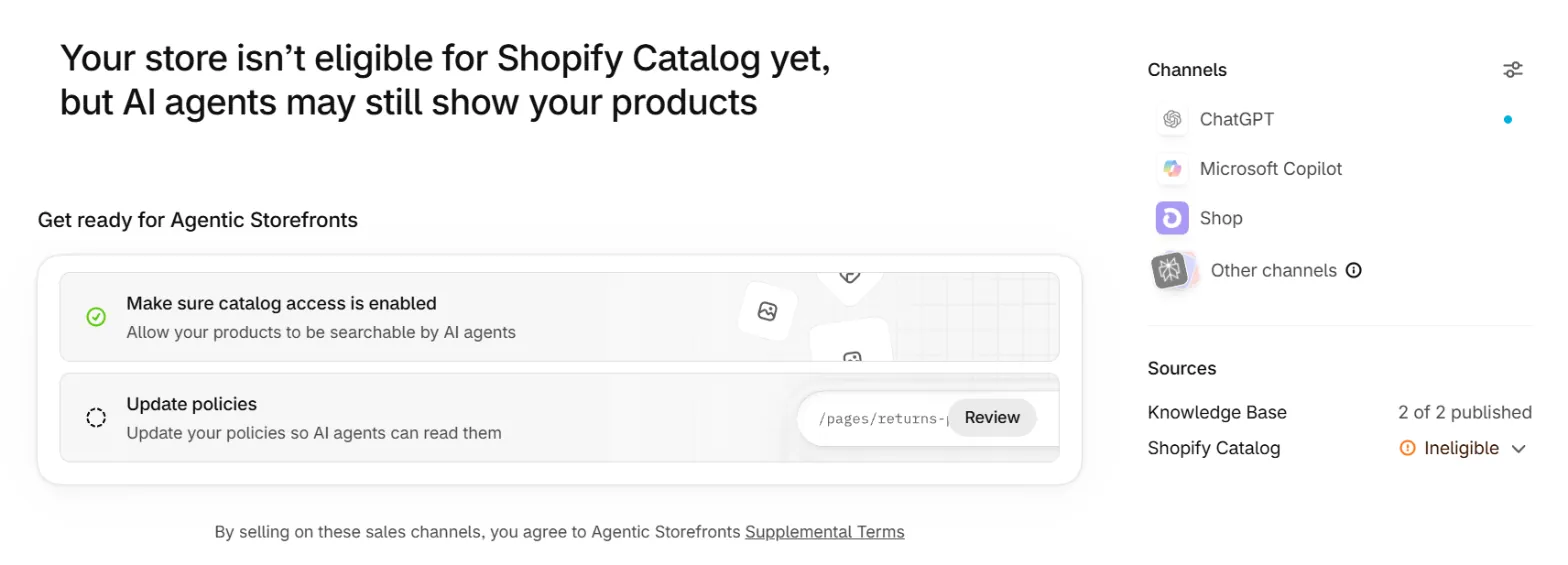
In the Shopify admin, the Agentic page also shows a “Get ready for Agentic Storefronts” checklist with two items: allow your products to be searchable by AI agents, and update your policies so AI agents can read them. To appear in any AI channel, Shopify requires completed Terms of service, Privacy policy and Return and refund policy pages, acceptance of the Agentic Storefronts Supplemental Terms, and products that are eligible for Shopify Catalog. Each channel adds its own rules, such as the countries you sell to.
What is Shopify Catalog?
Shopify Catalog is, in Shopify’s words, “a structured source of product information gathered from eligible products that are sold by stores on Shopify.” Shopify describes it as billions of products, which it categorizes, enriches and standardizes with its own AI models. Shop, AI platforms, shopping sites and AI agents search it for titles, prices and availability.
You don’t submit anything to it. Eligible products are included automatically, and a merchant can block individual AI channels but can’t opt out of Shopify Catalog itself. Being included also doesn’t guarantee a product appears in any particular AI answer: each channel ranks and words its own results.
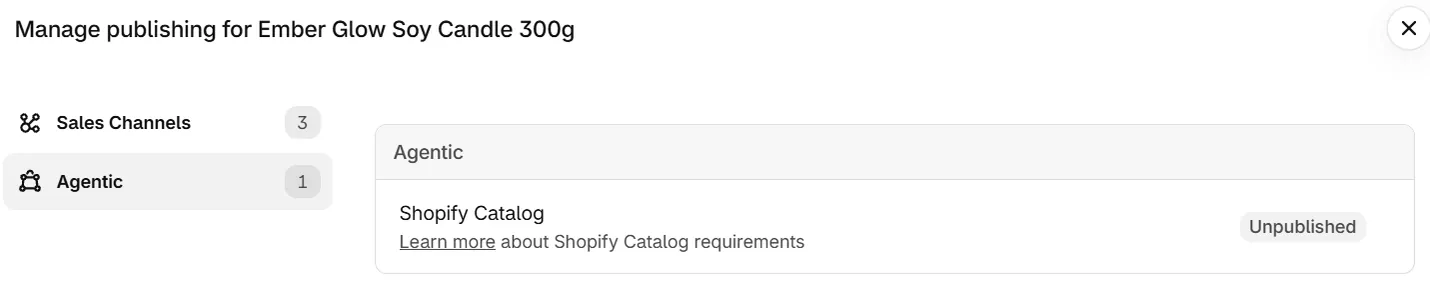
On each product, the Manage publishing panel has an Agentic tab beside Sales channels that shows the product’s Shopify Catalog status, for example “Shopify Catalog: Unpublished”, with a link to Shopify’s Catalog requirements.
Where does Shopify Catalog get its product data?
Shopify Catalog reads your Shopify products directly: by default, each listing carries the product’s title, description, options, images, price, availability and other key attributes. Shopify’s own advice for ranking well adds product type, vendor, collections, tags, barcodes (GTIN, UPC or ISBN) and variant option names to the list of what AI platforms consider.
Catalog mapping (the Channel mapping page, with Shopify Catalog selected) changes what Catalog receives without changing your online store:
| What you can change | Sources Shopify allows | Limits |
|---|---|---|
| Title and description | A product field or a metafield, combined with your own text or edited as Liquid | A product with an empty source falls back to the default field; changes take time to process |
| List price | Price or Compare-at price | Compare-at is used only when it is higher than the current price |
| Variant grouping | Product title with a delimiter, a product metafield, or a tag prefix | Up to 10,000 products per group by title or tag; custom grouping ignores the Combined Listings app for Catalog |
| Product category | None | Shopify says the category can’t be mapped for Shopify Catalog |
This is the line between Catalog and feed apps. A feed app builds a separate file or API feed from your products and sends it to Google, Meta, Microsoft and other channels. Its edits live in that feed, not in your Shopify product, so Shopify Catalog never sees them. A rewritten title in a feed app such as FeedShine reaches Google Merchant Center, and through it Google AI Mode and Gemini, but not ChatGPT or Copilot through Catalog.
FeedShine is made by the team that publishes this site. It is scored on the same criteria as the rest.
To change what Shopify Catalog shows, edit the product in Shopify or point Catalog mapping at a metafield that holds the version you want. For ChatGPT there is one more route: OpenAI takes a separate product feed added in ChatGPT Business Hub. FeedShine’s ChatGPT feed is a CSV to OpenAI’s spec, added there as a hosted URL, on every paid plan and for US shoppers for now. A store eligible for Shopify Catalog doesn’t need it. It helps stores that aren’t eligible, stores that want to send edited product data, and ChatGPT ads, where OpenAI’s Ads Manager builds campaigns from an uploaded product feed.
Which AI channels read Shopify Catalog, and which read a feed?
ChatGPT, Microsoft Copilot and Meta read Shopify Catalog. Google AI Mode and Gemini read Google Merchant Center, so Google is the AI channel on this list where a feed app sends the data. ChatGPT also accepts its own product feed through ChatGPT Business Hub, outside Shopify’s agentic storefronts.
| Channel | Where products come from | Customers you must sell to | Checkout |
|---|---|---|---|
| ChatGPT | Shopify Catalog | United States (the store can be based anywhere) | Some purchases complete in the chat; the rest go to your online store checkout in ChatGPT’s in-app browser or a new tab |
| Microsoft Copilot | Shopify Catalog | United States | Agentic checkout in Copilot, shown to US customers only |
| Google AI Mode and Gemini | Google Merchant Center, through the Google & YouTube channel or a third-party feed; products must also be Catalog-eligible | United States, Canada or Australia | Buy in Google’s interface, rolling out gradually |
| Meta (Meta AI and Muse) | Shopify Catalog; shoppable ads also need the Facebook & Instagram channel with product sync on | 11 countries, including the US, UK, Canada and Australia | In Meta; if Meta can’t collect what checkout needs, your checkout opens in Meta’s in-app browser |
For the Google route, Shopify says that if you reach Merchant Center “through a third-party feed provider or manual upload, then no additional setup is required in Shopify.” How products reach each assistant, including Perplexity, is covered in how products get into Google AI Mode, Perplexity and Copilot, and the feed apps for Merchant Center are ranked in the best Google Shopping feed apps.
Who is eligible for Shopify Catalog?
A store qualifies when it is on the Starter plan or higher, isn’t password protected or B2B-only, and has an account history Shopify accepts. A product qualifies when it has a title, at least one image and a price above zero, is published to the Online Store, Hydrogen or Headless channel, isn’t Unlisted, and isn’t in an excluded category such as alcohol, tobacco, CBD, weapons, event tickets or add-ons like warranties.
The history requirement is the one no setting fixes. Shopify asks for genuine sales to real customers, prompt fulfillment, low chargebacks, invoices paid on time and Shopify Payments in good standing. It says “Eligibility is reviewed over time”: a store can become eligible later, and can lose eligibility if it stops meeting the requirements. In the Shopify admin, a store that doesn’t qualify yet sees “Your store isn’t eligible for Shopify Catalog yet, but AI agents may still show your products,” and the reason reads: “A strong history of legitimate, well-managed orders will improve your standing over time.” No feed app changes any of this. The fixes for each ineligibility message are in why products aren’t showing in ChatGPT.
How do I hide products from AI channels or opt out?
Set a product’s status to Unlisted to hide it from every AI channel. Shopify warns that Unlisted also removes the product from sitemaps, search engines such as Google, and your online store’s search.
To stop one channel reading all your products, go to Sales channels > Agentic, open the channel settings, switch from Manage for me to Manual, pick the channel and turn off its Shopify Catalog access. Shopify says it can take up to 7 days before the data stops being shared, and that turning off Catalog access for ChatGPT or Copilot also turns off their agentic checkout. Google AI Mode and Gemini are managed in the Google & YouTube channel or Merchant Center instead.
Two limits apply. Turning off Catalog access for ChatGPT or Copilot doesn’t fully hide products, because those channels can still find them by crawling the web. Blocking crawlers in robots.txt works the other way round: it affects only the open web and doesn’t stop Shopify Catalog sending product data. B2B-only products are left out automatically when Shopify can identify them, but B2B setups built with third-party apps may need hiding by hand.
What is the Shopify Agentic plan?
The Agentic plan, announced on January 11, 2026, lets brands that don’t run their online store on Shopify sell through Shopify Catalog and the AI channels. Products go in by CSV import, the GraphQL Admin API or a PIM connector app, and each one needs an external product URL that points to its page on the brand’s existing store. Agentic checkout starts switched off on this plan, and Google AI Mode and Meta still need the Google & YouTube and Facebook & Instagram channels.
What are the Shopify Catalog API and Global Catalog?
They are developer interfaces for people building shopping agents, and a merchant doesn’t need to do anything with them. Global Catalog searches products across all Shopify merchants through one endpoint (catalog.shopify.com/api/ucp/mcp), and Storefront Catalog does the same for a single store at that store’s own domain. Both offer search_catalog, lookup_catalog and get_product tools, implement the catalog capability of the Universal Commerce Protocol, and authenticate with an agent profile rather than an API key. The Catalog API gives direct search access to Global Catalog without carts or checkout. How these protocols fit together is in ACP, UCP and Instant Checkout for Shopify stores, and what to fix in your product data first is in the agentic commerce product data checklist.
Questions people also ask
Does Shopify Catalog replace product feeds?
For ChatGPT, Microsoft Copilot and Meta's AI discovery, yes: Shopify sends the data and you don't build a feed. Google AI Mode and Gemini still read Google Merchant Center, and Meta's shoppable ads still need the Facebook & Instagram channel's product sync, so those feeds stay.
Does being in Shopify Catalog guarantee my products show up in ChatGPT?
No. Shopify says inclusion doesn't guarantee a product appears in a specific AI answer, because each channel ranks and words its own results. The Ranking preview on the Agentic page shows how your products might rank for a search.
Do I have to pay to sell through Shopify agentic storefronts?
Shopify lists no ChatGPT, Copilot, Google AI Mode or Meta fees for agentic storefronts. You pay your standard payment processing fees on the orders.
Sources
Page updated November 26, 2026. App prices, ratings and channels come from each app's own listing and website, checked on the dates below.
- Shopify agentic storefronts (Shopify Help Center) checked November 26, 2026
- Managing agentic storefronts (Shopify Help Center) checked November 26, 2026
- Shopify Catalog (Shopify Help Center) checked November 26, 2026
- Requirements for being included in Shopify Catalog (Shopify Help Center) checked November 26, 2026
- Customizing product data for Shopify Catalog (Shopify Help Center) checked November 26, 2026
- Optimizing products for AI platforms (Shopify Help Center) checked November 26, 2026
- Shopify Catalog and product discovery for agentic storefronts (Shopify Help Center) checked November 26, 2026
- Selling on ChatGPT (Shopify Help Center) checked November 26, 2026
- Selling on Google AI Mode and Gemini (Shopify Help Center) checked November 26, 2026
- Selling on Microsoft Copilot (Shopify Help Center) checked November 26, 2026
- Selling on Meta (Shopify Help Center) checked November 26, 2026
- Setting up agentic storefronts for stores on the Agentic plan (Shopify Help Center) checked November 26, 2026
- The agentic commerce platform: Shopify connects any merchant to every AI conversation (Shopify, January 11, 2026) checked November 26, 2026
- Submit product feeds (OpenAI developer docs) checked November 26, 2026
- Create campaigns from product feeds (OpenAI Help Center) checked November 26, 2026
- FeedShine: ChatGPT feeds checked November 26, 2026
- About Catalogs (Shopify developer docs) checked November 26, 2026
- Agentic commerce (Shopify developer docs) checked November 26, 2026
- FeedShine: apps.shopify.com/feedshine checked November 25, 2026
- FeedShine: feedshine.app/pricing checked November 25, 2026